More often than not, I see Desktops litered with shortcuts to programs, folders, documents and files. Honestly, do you really use each of those programs on your Desktop every time you’re on your computer? You can actually clean up your Desktop yet still have really quick access to your programs and files. I’m taking about the Toolbar feature of Windows Taskbar.
1. Create a holding folder
I created my folder called Utilities in My Documents. Then, I placed my Desktop shortcuts in this folder. Feel free to create sub-folders of categories, like, Multimedia, Networking, etc.
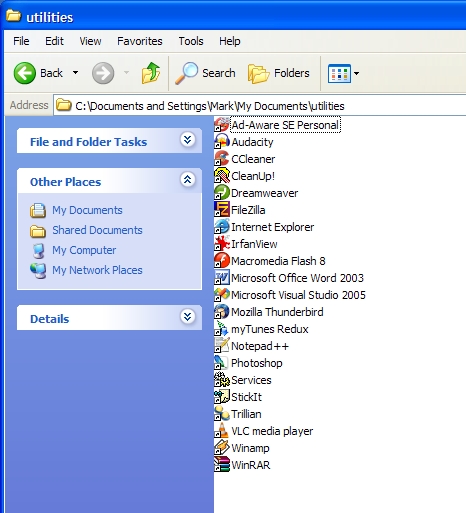
2. Create a toolbar
Right-click on the Taskbar, go to Toolbars > New Toolbar …
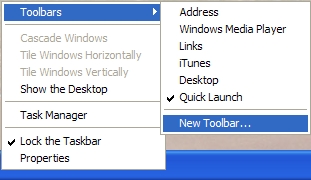
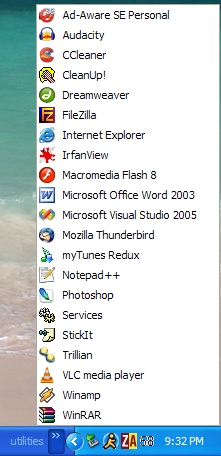
Browse to your newly created holding folder and click OK at the end. Now, just click the arrows next to the folder name on the right side of the Taskbar and your folder will expand to its contents of billions of programs you have shortcuts to but never seem to use (at least often enough).
I blame the software developers for defaulting everything to a recent directory, a download directory or simply tossing it on the desktop. I spend so much time each time I run a program to point it to the right directory and not all days I have the time so i toss them flat on desktop where I won’t look for it cause it’s right there.
What software developers need to do is have their SAVE automatically CREATE a directory in My Documents as the software’s NAME and we save it there without creating or tossing it in downloads where it’s a mess also.
Good advices though.