HOWTO: Use Gmail Through IMAP
[ 24 October 2007 ]
Marked under time savers.

Gmail just started to roll out its new IMAP compatibility feature. It’s simple to setup, so here’s how to do it.

First, in Gmail, find the IMAP settings by navigating to Settings > Forwarding and POP/IMAP.
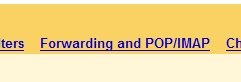
Forwarding and POP/IMAP

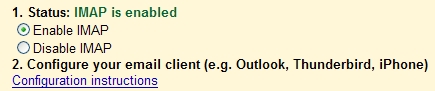
Next, enable it:

Enable IMAP

Now you just need to configure your email client with a new IMAP account. See Google’s guide for client settings.


1 Comment on “HOWTO: Use Gmail Through IMAP”

VIGNESH says:

I want to configure the gmail account in my Outlook .Plz give me solution for this.I couldnt open

Speak your mind:

Allowed HTML: <a href="" title=""> <abbr title=""> <acronym title=""> <b> <blockquote cite=""> <cite> <code> <del datetime=""> <em> <i> <q cite=""> <strike> <strong>


Home


Article


Recent articles


Articles marked as


Search


spam, email at: spamstudygonewild+atm@gmail.com