Most email clients out there are left open when someone’s on their computer. This allows new mail to get updated regularly so the user can be alerted of the mail. Most clients also have a minimize to try feature so the program doesn’t get in the user’s way. Mozilla Thunderbird, unfortunately, does not have this built-in minimize feature. It’s easy to fix that though. Download the MinimizeToTray Thunderbird extension. It also works with Firefox and other Mozilla programs.
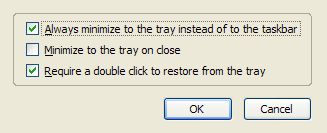
Once you download and install it, just go to the option menu from the Add-ons box.