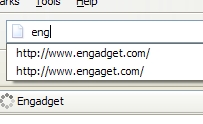
 Have you ever misspelled a website in the address bar [in Firefox] and now it shows up in the drop-down history when you start to type the URL? Well, recently this happened to me when I was going to Engadget. To get rid of the misspelled domain, just start to type the URL in and use the down arrow until the misspelled domain is highlighted. Now hit the Delete key. And…done. Who would’ve thought that Firefox was smart enough to delete stuff when you hit the Delete key? I’m using Firefox 2, but feel free to let me know what other browsers this works in.
HOWTO: Quickly Remove Misspelled URLs from Firefox History
Published in general
I find that this is also useful with the input boxes. If you have misspelt your name for instance then you can delete it too.