If you use my previosuly featured method of blocking websites using the HOSTS file, then you probably know it’s annoying to navigate to that file to disable it. Why would you want to disable it you may ask? Well, let’s say you go to a website numerous times and you’re unable to reach it. Other people can see it, but you claim the site is down. Maybe you’re blocking it in the HOSTS file. Well, disabling it is one way to find out. Instead of finding the file and renaming it to disable the blocking, you can run this simple script I wrote. It will enable/disable the HOSTS file and tell you what state the file is in. Toss it in your system32 directory and you can run it from the Run box. The script renames hosts to hosts1 and vice versa
You can download the file (hosts.bat) or you can just copy the script below:
@echo off

cls
cd C:\WINDOWS\system32\drivers\etc
if exist hosts goto two
:one

ren hosts1 hosts

echo.

echo   hosts ENABLED

echo.

goto end
:two

ren hosts hosts1

echo.

echo   hosts DISABLED

echo.

goto end
:end

pause
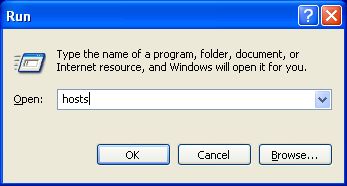
Disable/Enable via the Run box.


This on-the-fly method is exactly what I was looking for. Blocking using this method works well most of the time but sometimes causes problems displaying websites. So it’s great to know how to turn it on and off easily, thanks very much.
I just use Hostman, which has it’s own toggle for the hosts file; it is a whole lot simpler and easier to do than the procedure you describe.
Hey Kerry… I am so delighted you have bought some shareware or whatever.
I really hate when I am trying to find information about a subject and some loser pollutes a forum with their personal alternative.
Here is a kindergarten analogy for you. Imagine this was a forum about apples. Different varieties, growing techniques even recipies for apples. Someone asks an interesting apple related question and your awesome input is to say “I like Oranges”.
Yes I see the irony of me using this forum space to explain this to you, but just maybe some other shareware enthusiast out there may just read this and mercifully keep their burning need to proselytize limited to their facebook friends.
Hey, thanks for the help. I’ve been looking for a quick fix for this for awhile.
I have to ask, though, for a few more details about how to toggle it on and off. When I run it via the Run box it doesn’t consistently toggle enable/disable, and a “Access denied” message appears at the top of the window. I’ve found that I have to manually find the file in my hard drive and right click “Run as administrator” for it to work… but then it’s not such a quick fix anymore. 🙂
Charlie, you should probably do your research before posting a comment. And you should also take a deep breath before posting a comment. Try to think back about when you knew absolutely nothing about computers. Then decide if you would use a batch file or a program with a GUI to do a task. HostsMan is a free download if you would have bothered to check.
Great lil batch (I love batch files)
But…
How do I get windows (7) to understand that it is off now.. (or on)
it seems to be holding the Hosts in some sort of cache or something..
thoughts?
Successfully disabled, but requires an elevated prompt to enable for some reason