Windows Task Manager is a very common utility for some people. Computer slow? Go to Task Manager and kill some processes. Something not responding? Go to Task Manager. I guess Task Manager is pretty good, considering it’s a built-in feature of Windows. Well, Sysinternals (which was recently acquired by Microsoft), has a replacement for Task Manager. It’s called Process Explorer. I’ve been using it for a long time and I think you should make the switch. Why?
- Process Explorer updates a lot of system info in real time (updates every 1 second).
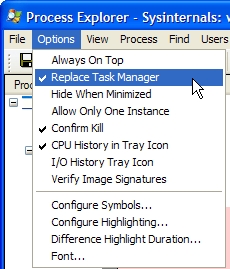
- Process Explorer can be configured to replace Task Manger, so when you click the Task Manager link or hit Ctrl + Alt + Del, Process Explorer will open instead.
- Process Explorer can be used to search for thread handles and running DLLs.
- Process Explorer can explore each individual process, as the name suggests. You can see events, files, devices, and registry keys being accessed.
- Process Explorer is free and requires no installation.
So… now that you’re intending to make the switch, I’ll walk you though it.
Download
Go ahead and download Process Explorer (1.5 Mb) for free from the Sysinternals website. Unzip the folder. Choose a good location, such as C:\Program Files\Process Explorer\.
Play around
Open procexp.exe and start to explore. You can explore all of the processes running on your machine. You can even see how much CPU time is being used on hardware interrupts (that’s an example of the power this utility gives you).
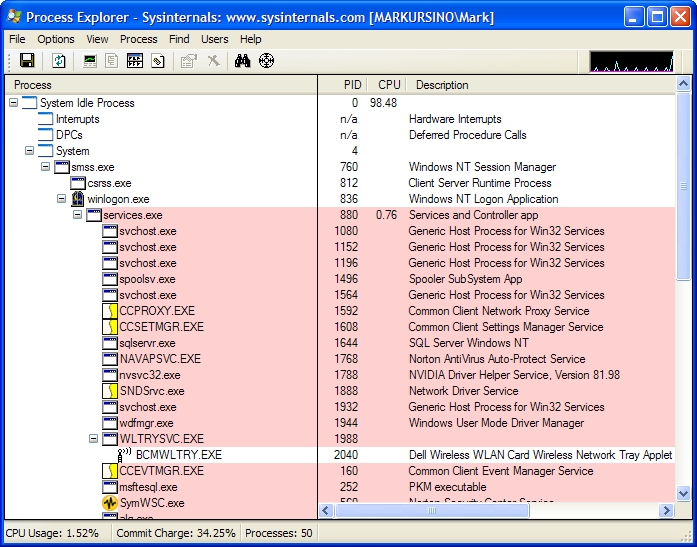 (click to enlarge)
Set Process Explorer to be your new Task Manager
Go to Options > Replace Task Manager. Done.
Enjoy and let me know what you like/don’t like about this app. I’ve been using a bunch of the free apps from Sysinternals for years, so let me know what you think about others as well.
I down loaded, process explorer. It looks good, gives a lot of infro.looked good until I tried to hook up to the internet. then everything went wrong. Maybe if you would explane what to do after the download.
Bob
Process Explorer should not affect your Internet connection in any way. It’s a program that explores your operating system (Windows), so it should have no affect on your Internet. What actually “went wrong” with your Internet? All PE does is it gives you more info than the basic Task Manager. It gives in-depth information that might not really be necessary for basic users.
When i used the option “Replace Task Manager” i lost my Task Manager.
When i try to start my Task manager (ctrl+alt+delete), nothing happens, and the Procces Explorer does also not start up.
How do i get back to my old Task Manager and remove the Procces Explorer option.
I’m using Windows Vista Ultimate x86 and Process Explorer v10.21
Jacob Stokholm
Jacob,
I’ll research the issue. Could be a problem with Vista itself. I’m not sure if PE supports Vista.
I’m experiencing the same issue that Jacob mentioned with Task Manager, although on Vista x64. According to the PE page at Microsoft, it is supported on Vista; the last two “What’s new” entries specifically added Vista functionality.
Running taskmgr.exe directly produces an error that Task Manager doesn’t exist — I’m not sitting at my Vista box, so I don’t recall the exact wording. Selecting the “Replace Task Manager” option never checks the option either.
Copying taskmgr.exe over from the Vista DVD fixes the error, so it appears that PE patches taskmgr.exe to run PE whenever it’s called up.
Hi Mark,
I experienced the same problem with Vista Utimate and PE. Logging on as Administrator is OK, Logging on as myself with Administrator credentials and starting the task manager the usual way (C-A-D > Nothing happens, or right click clock > Pop-up “No right to perform operation” ) Starting procexp.exe directly runs it normally. Then take out the tick that tells PE to take over the taskmgr and the usual Vista taskmgr reappears. I tried to set full rights for me to tasmgr.exe in \system32 to no avail and set full rights for me on procexp.exe but still no rights. Rights management is OK with me but it really can be to tight too. This clearly is a bug in Vista for I cannot reproduce it in XP or 2000 as far as I understand it now
Oh, by the way, I use Sysinternals for years too. Great stuff
Good Luck,
Peter
Hi Mark,
im running into the same problem when using “replace task manager”. Do you have new information about the issue? Is there a workaround? I’d hate to be stuck with the standard task manager..
Tom,
I assume you are also using Vista, correct? Since Microsoft has actually taken ownership of Sysinternals, I suggest you visit the MS site and browse for problems. If you have no luck, try to contact the Sysinternals division at Microsoft. You can even refer them back to this page where they can read some comments by others regarding issues with Vista.
Microsoft’s Process Explorer v10.21
For those with Vista problems… check out: http://www.howtogeek.com/howto/windows-vista/replacing-task-manager-with-process-explorer-in-vista/
Thanks! was able to kill an process that was hogging cpu, but didn’t show up in the regular manager thing.
Just grabbed hold of this and installed.
Works flawlessly on my XP box and allows me to do what I had hoped where the original task manager failed.
I had a problem with mIRC dissappearing from my systray but still running in Processes and in the windows TM there is no way to rescue the original instance, you have to end task and restart it.
No good if you want to read what went on overnight when you wake up in the morning.
PE gives the option to ‘Restore’ a process.
I’m pleased with this product , many thanks.
Mark.
My crtl-alt-delete task manager disappeared as well on my XP machine, but I got it back by clicking “Restore Task Manager” in PE. So selecting the “Replace Task Manager” gives you nothing.
So is there an easy way to open PE? I don’t see it listed as a program. Is there an icon I can put on my desktop or the system tray?
Wow! Works great on my XP Home. My task manager somehow got reduced to just the window that shows running programs. Nothing else. This replaced TM with a much better interface! Now I can see it all- and better control, too!
I’ve been using Daphne task manager replacement for a while. As an open source alternative to standard windows’ task manager and to Process Explorer too. I prefer Daphne for it’s simpler GUI and features for getting multidesktop environment.